Showing posts with label gadgets. Show all posts
Showing posts with label gadgets. Show all posts
The major technology-related trade show held in Las Vegas is over but the gadgets which made their first appearance to the pubic is still yet to get into the stores in all countries. Today i share some of the best gadgets that came out in Consumers Electronic Show ( CES ). I hope you all will like this gadgets.


- Sportis: If you want to check your stats while working out or going on a bike without losing focus on what you’re doing? Then this is the correct gadget, Sportiiiis a pair of glasses for a heads-up display that’s positioned in your secondary vision. You can create personalized profiles to maximize your workouts –tapping the unit switches between sensors for audio feedback and ANT+ compatible visual cues.Price of this gadget is $199

- Samsung Exhilarate: This year's CES brought a slew of new 4G LTE phones, but the Samsung Exhilarate's appeal doesn't come from its specs as much as its price: $50. Coming to AT&T's 4G network in the coming months, the Exhilarate will have a 4" Super AMOLED display, front- and rear facing cameras, and access to AT&T U-Verse Live TV. And it's environmentally friendly; the Exhilarate's made from 80% recycled post-consumer materials and features special modes for energy efficient operation.

- Razer Naga Hex Gaming Mouse: Usually when you are playing games, when u have to use multiple keys on keyboard along with mouse. This will be very difficult and makes one more irritated while playing. This Razer Naga Hex gaming mouse makes you to play a game without getting irritated by keys on keyboard and mouse.This comes with 6 mechanical thumb buttons optimized for role playing or multiplayer online battling, plus 11 programmable ones. Interchangeable thumb rests and an curved shape keeps your hand poised for action.Price of this gadget is $79.

- Polaroid SC 1630 Smart Camera: Many smartphones are emerging into the market now-a-days but only few of them have a smart camera. But this smartphone has 16-megapixel view, a 3X optical zoom and a 3.2” LCD screen.Hey not only that this comes with android OS and USB cord with Wi-Fi and Bluetooth wireless.You can take amazing photos from this smart camera and edit photos using amazing apps from android and upload to social networking sites. This smart camera really rocked at CES. Hope you guys like this very much.

- SpareOne's 15yrs battery phone: The SmartOne which made waves in the firrst day of the Consumer Electronics Show in Las Vegas.If you look at the front of the phone, you’ll notice the buttons are easy-to-read and laid out like a regularphone. You can however preset numbers to make calls. It has no screen, a basic number pad, and relies on a single AA battery for power. It's not for daily use, of course; the $50 SpareOne, which can always dial 911 but needs a SIM card to make regular calls.

- Samsung Smart Evolution:
*Smart TV, with a promise that models bought now will in future be upgradeable through a simple add-on part.
*3D content for TVs.
*The 5in Note "phablet" (a phone/tablet), introduced in the UK in October 2011 but new to the US.
*Wi-Fi enabled cameras.
*A (very impressive) 55in Super OLED TV.
*A new ultrabook.
*An app winner who devised an app intended to run across Samsung Smart TVs, tablets and phones, who won $100,000.

- Ear Force Wireless Dolby Surround Sound Gaming Headset: Wireless audio domination is yours since the CD-quality signal uses dual band Wi-Fi for transmitting audio to/from your gaming console. The headset provides positionable, simulated 5.1 multichannel audio as well as Bluetooth pairing for answering mobile calls while gaming. Add equalization, volume limiter control and up to 15 hours of rechargeable power and this can send the audio to your home theater at the same time.And the price of this device is $219.

- Nokia Lumia 900: Many amazing smartphones has been released by Nokia in recent. But the Lumia family devices has got much more consumers responses than any other smartphones launched by Nokia. This amazing smartphone has become really smart with Windows OS. Many amazing features has made consumers to turn to this gadget.And this is specially built for U.S consumers.It comes with LTE-capable 4.3-inch screen. It shares same design as the 3G Lumia 800, but has a bigger 1840 mAH battery to give better performance on the power-hungry 4G network. Another amazing about this is camera.It's front and back cameras, the back camera has a wide-angle 28mm f/2.2 lens; the front-facing lens is f/2.8.

The SmartOne is making waves in the firrst day of the Consumer Electronics Show in Las Vegas.If you look at the front of the phone, you’ll notice the buttons are easy-to-read and laid out like a regularphone. You can however preset numbers to make calls.


Watch the video about this mobile:

This mobile has been made by a company, Spareone. This phone has been designed for emergency situations.This cellphone runs on single AA battery. You may know the problems that are facing by the consumers due to less battery backup's. And one should take care of charging their mobiles before going out so that they can make calls or SMS while they are out also.That's all of a big head ache. But this head ache has got a medicine by SpareOne company.The amazing battery life of 15 yrs makes one to forget about charging their batteries :P .
This phone also has many advantages. One another advantage other that battery life is emergency tool i.e. With a built in emergency flashlight and the ability to automatically transmit its location via the cell ID, SpareOne is the only reliable tool for urgent response during a crisis or natural disaster when AA batteries become the only source of power.
The phone will be available in Q1 2012 at the price of $49.99.

Washington, Jan 8 (ANI): An Arizonan engineer has come up with a wearable LED television that can be worn as a jacket and shows episodes of American animated sitcom, The Simpsons.
David Forbes, an electrical engineer by profession, was keen on building something really cool to wear at the Burning Man festival. So he re-purposed a comparatively simple flexible circuit board covered with LEDs.
He made the first with 30 rows of four LEDs each and then contracted a manufacturer to build 175 more of them. He attached them to an old coat and was able to build a display with a 160 x 120 resolution, which he notes on his blog is exactly half that of an iPod, Discovery News reported.
The set-up comprises a chip similar to that used in scaling down the images for security cameras , and another chip similar to the one used in controlling big LED signs used for advertisements. Forbes was able to put together his wearable display by adding a small set of circuits that convert video output of the iPod to the smaller resolution.

A full wrap-around display is priced at 39,995 dollars while a front-only will cost 24,995 dollars. Wait time is around four months. (ANI)

A full wrap-around display is priced at 39,995 dollars while a front-only will cost 24,995 dollars. Wait time is around four months. (ANI)
A group of scientists at Korea Advanced Institute of Science and Technology (KAIST) has fabricated a working computer chip that is almost completely clear, the first of its kind. The new technology, called transparent resistive random access memory (TRRAM).
The new chip is similar in type to an existing technology known as complementary metal-oxide semiconductor (CMOS) memory common commercial chips that provide the data storage for USB flash drives and other devices. Like CMOS devices, the new chip provides "non-volatile" memory, meaning that it stores digital information without losing data when it is powered off. Unlike CMOS devices, however, the new TRRAM chip is almost completely clear."It is a new milestone of transparent electronic systems," says researcher Jung Won Seo, who is the first author on the paper. "By integrating TRRAM device with other transparent electronic components, we can create a total see-through embedded electronic system."

"We are sure that TRRAM will become one of alternative devices to current CMOS-based flash memory in the near future after its reliability is proven and once any manufacturing issues are solved," says Professor Jae-Woo Park, who is Seo's co-advisor and co-author on the paper. He adds that the new devices have the potential to be manufactured cheaply because any transparent materials can be utilized as substrate and electrode. They also may not require incorporating rare elements such as Indium.
The fabricated TRRAM has a transmittance of 81% (including the substrate) in the visible region and an excellent switching behavior under3 V. The retention measurement suggests that the memory property of the TRRAM device could be maintained for more than 10 years. We believe that the TRRAM device presented in this work could be a milestone of future see-through electronic devices.
I think in future the iphone may be like the below image..!! :P

Intel may unveil its next generation of processors--nicknamed "Ivy Bridge"--in April, according to the latest reports. The Ivy Bridge chips for desktops and laptops promise a 37 percent performance increase over the current generation of Sandy Bridge processors.
The new Ivy Bridge CPUs use a 22-nanometer architecture, which makes them almost 30 percents smaller than the current chips, which use a 32nm architecture. Smaller chips mean lower power consumption (which is great for battery life) and more room for the integrated graphics chip. Ivy Bridge will support DirectX 11, Thunderbolt, and USB 3.0.
Taiwan-based trade publication DigiTimes reports that the first Ivy Bridge processors to launch will be quad-core desktop processors: the Core i7-3370 series and the Core i5-3570, 3550, and 3450. Because Ivy Bridge is backward-compatible with existing Sandy Bridge motherboards, desktop users should have an upgrade path available.
The first Ivy Bridge notebook chips to launch, according to DigiTimes, will be the Core i7 chips as well: The Core i7-3920QM, 3820QM, and 3720QM. Core i5 processors will pop up later.
Ivy Bridge will be smaller, more powerful, and more energy-efficient, and should be here in just a few months.
Source:http://www.pcworld.com
What if every light bulb had its own unique Internet IP address? The possibilities are endless: You could monitor, manage and control every light bulb from any Internet-enabled device- turning lights on and off individually, dimming or creating scenes from your smartphone, tablet, PC or TV – to save energy as well as electricity costs.

NXP has unveiled technology that has to potential to provide every light bulb with its own IP address. In this
way, light bulbs could be controlled from any internet enabled device. The approach builds on its recent
acquisition of Jennic.
The technology, called GreenChip, is small enough to fit within the base of a regular energy efficient light
bulb. Two versions will be launched: GreenChip iCFL, for use with compact fluorescents (cfl); and GreenChip
iSSL, for use with leds. Both chipsets can act as dimmable drivers for smart lamps and are accompanied by:
a standby supply controller, with 10mW no load capability; a 2.4GHz IEEE802.15.4 compatible wireless
microcontroller; and wireless connectivity, enabled by the JenNet IP network layer software.
John Croteau, NXP’s general manager, power lighting solutions and high performance RF, said: “chipset has very low power consumption so it doesn’t negate the benefits of energy efficient lighting. And the cost structure is such that it can ship in consumer light bulbs.”
NXP is partnering with TCP, a leading manufacturer of cfl and led lamps. “TCP makes more than 1million
light bulbs a day,” said Croteau, “and will be launching consumer ready products. This is not a technology
demonstrator.” A further partnership with GreenWave Reality will see an intelligent lighting control and
management solution becoming available.
NXP will also making the technology available under an open source licence and will establish a
consortium to oversee its development. “There will not be an ‘internet of things’ if technology is proprietary or with royalties,” Croteau noted, adding “and if it only works with the iPhone, it won’t be deployable.”
NXP will be taking on ZigBee in the emerging wireless control sector, even though Croteau said this
wouldn’t be the case. “It’s not about competing with ZigBee,” Croteau claimed, “it’s about delivering
something people want to buy.”
Here is a video about this Smart lightning.
Please share this if you like.
Hi friends today i am going to share about one of the tablet phone that creating sensation in the market.
The main reason to create sensation is its price. In the world for the 1st time a powerful Android tablet is of price 2,999 only..!!
Yes this is true.And this has been done by a company named DATAWIND.
Datawind Ltd. is a leading developer of wireless web access products and services.

Hardware:
Processor: Connexant with Graphics accelerator and HD Video processor
Memory (RAM): 256MB RAM / Storage (Internal): 2GB Flash
Storage (External): 2GB to 32GB Supported
Peripherals (USB2.0 ports, number): 1 Standard USB port
Audio out: 3.5mm jack / Audio in: 3.5mm jack
Display and Resolution: 7” display with 800x480 pixel resolution
Input Devices: Resistive touch screen
Connectivity and Networking: GPRS and WiFi IEEE 802.11 a/b/g
Power and Battery: Up to 180 minutes on battery. AC adapter 200-240 volt range.
Software:
Supported Document formats: DOC, DOCX, PPT, PPTX, XLS, XLSX, ODT, ODP.
PDF viewer, Text editor.
Multimedia and Image Display:
Image viewer supported formats: PNG, JPG, BMP and GIF
Supported audio formats: MP3, AAC, AC3, WAV, WMA
Supported video formats: MPEG2, MPEG4, AVI, FLV
Communication and Internet:
Web browser - Standards Compliance: xHTML 1.1 compliant, JavaScript 1.8 compliant
Separate application for online YouTube video
Safety and other standards compliance
CE certification / RoHS certification:
Other: Additional Web Browser: UbiSurfer-Browser with compression/acceleration and IE8 rendering.
High Quality Web Anytime & Anywhere:
Connect via GPRS or WiFi
GPRS: Embedded modem eliminates the need for external dongles and allows Internet access everywhere
WiFi: Allows fast Youtube videos at hotspots
Fast web access even on GPRS networks, across the country using DataWind’s patented acceleration technology
Web, Email, Facebook, Twitter and much much more!
Multimedia Powerhouse:
HD Quality Video
Watching movies in the palm of your hand on a 7” screen
Audio library software helps manage your full collection of songs
Applications Galore with Android 2.2:
Games
Productivity software: Office suite
Educational software
Over 150,000 apps!
Full sized-USB port & Micro-SD slot:
Expand memory to 32GB
Use any ordinary pen-drive
Even plug-in a 3G dongle
The main reason to create sensation is its price. In the world for the 1st time a powerful Android tablet is of price 2,999 only..!!
Yes this is true.And this has been done by a company named DATAWIND.
Datawind Ltd. is a leading developer of wireless web access products and services.
From past 8 months this company is trying to develop cheapest Android tablet for the sake of students.And finally the dreams of this company has came true.
They have created a tablet named AAKASH UBISLATE with Android 2.2v.

The configuration of this tablet phone is:
Memory (RAM): 256MB RAM / Storage (Internal): 2GB Flash
Storage (External): 2GB to 32GB Supported
Peripherals (USB2.0 ports, number): 1 Standard USB port
Audio out: 3.5mm jack / Audio in: 3.5mm jack
Display and Resolution: 7” display with 800x480 pixel resolution
Input Devices: Resistive touch screen
Connectivity and Networking: GPRS and WiFi IEEE 802.11 a/b/g
Power and Battery: Up to 180 minutes on battery. AC adapter 200-240 volt range.
OS: Android 2.2.
Document Rendering.Supported Document formats: DOC, DOCX, PPT, PPTX, XLS, XLSX, ODT, ODP.
PDF viewer, Text editor.
Supported audio formats: MP3, AAC, AC3, WAV, WMA
Supported video formats: MPEG2, MPEG4, AVI, FLV
Separate application for online YouTube video
Safety and other standards compliance
Some features of this tablet:
High Quality Web Anytime & Anywhere:
Connect via GPRS or WiFi
GPRS: Embedded modem eliminates the need for external dongles and allows Internet access everywhere
WiFi: Allows fast Youtube videos at hotspots
Fast web access even on GPRS networks, across the country using DataWind’s patented acceleration technology
Web, Email, Facebook, Twitter and much much more!
Multimedia Powerhouse:
HD Quality Video
Watching movies in the palm of your hand on a 7” screen
Audio library software helps manage your full collection of songs
Applications Galore with Android 2.2:
Games
Productivity software: Office suite
Educational software
Over 150,000 apps!
Full sized-USB port & Micro-SD slot:
Expand memory to 32GB
Use any ordinary pen-drive
Even plug-in a 3G dongle
For this tablet external car charger and antenna are provided as accessories and one more thing is that you can connect an external keyboard case whenever needed.
Drawbacks of this tablet:
This tablet with lot of features has also have some of the drawbacks i.e its screen touch is of resistive type which makes the scrolling little bit tough and its camera is VGA camera.And the main drawback is that it has no place in Android market.
But this Android with relatively low price is going to rock really with more that 1,50,000 applications and games.
 |
| AAKASH UBISLATE |
 |
| Tablet with keyboard. |
You can book this tablet for you online at http://www.akashtablet.com.
Enjoy..!!
Enjoy..!!
Here is a video of this tablet by NDTV watch it:
Hey as we all know that now-a-days competition in mobile phones is increased.
And Samsung has crossed Nokia in this competition but now again Nokia is fighting back.

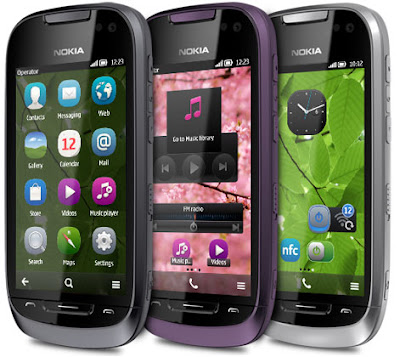
Steel Dark
Amethyst Violet
menu
widgets
themes
shortcuts

And Samsung has crossed Nokia in this competition but now again Nokia is fighting back.
Nokia has realeased Nokia 701 symbian phone which is fastest phone in Nokia mobiles.
The main thing in this phone is its powerfull hardware.i.e it has A1 GHz processor makes everything run smoothly.

Features of Nokia 701:-
*Super style Smart design
*Home screen designed by you
*Built in NFC
*8Megapixel Camera
*Apps and HD games

Specifications:-
Dimenisons:
Size: 117.2 x 56.8 x 11 mmWeight (with battery): 131 g
Volume: 64 cc
Memory:-
Internal memory: 8 GBSupport for up to 32 GB with an external microSD memory card
Use as USB mass memory device for storing photos, documents and more
Available colors:-This phone is available in 3 colors.
Silver LightSteel Dark
Amethyst Violet
Display:-
Screen size: 3.5"Resolution: 16:9 nHD (640 x 360 pixels) IPS-LCD
16 million colours; 160° viewing angle
ClearBlack display
Capacitive touch screen
Orientation sensor
Proximity sensor
Ambient light detector
Personalization:-
Up to six customisable home screens:menu
widgets
themes
shortcuts
Customisable profiles
Ringtones: mp3, AAC, eAAC, eAAC+, WMA, AMR-NB, AMR-WB
Video ringtones
Themes
wallpapers
screensavers
audio themes
pre-installed themes
changeable colour themesMore wallpapers, ringtones and themes available from Store
screensavers
audio themes
pre-installed themes
changeable colour themesMore wallpapers, ringtones and themes available from Store
Connectivity:-
Bluetooth 3.0High-Speed USB 2.0 (micro USB connector)
Micro USB connector and charging
2 mm charging connector
Standard 3.5 mm AV connector with TV-out
NFCW
LAN
A-GPS
FM transmitter
Software platform:-
Symbian BelleJava MIDP 2.1
Qt 4.7.3, Web Runtime 7.2
HTML 4.1
HTML 4.1
Software updates over the air (FOTA) and over the internet (FOTI)
Flash Lite 4.0
OMA DM 1.2, OMA Client provisioning 1.1
Internet:-
Full web browsing of real web pagesWeb browsing with touch control
Supported markup languages: HTML, XHTML MP, WML, CSS
Supported protocols: HTTP v1.1, WAP
TCP/IP support
Visual history, HTML and JavaScript support
Flash Lite 4 will support a majority of Flash Player 10.1 content
Nokia Mobile Search
RSS reader
Support for streaming video
Unified home screen access to Facebook and Twitter through the Social client
Upload and view photos and videos and see locations via the Social client
Music:-
Stereo music player supporting MP3, M4A, AAC, AAC+, eAAC+, WMAMusic Player
Flick scrolling user interface to browse the albums in your music collection
Ovi Music Unlimited service in selected markets
Nokia Music PlayerOvi Music
Audio codecs: MP3, WMA, AAC, eAAC, eAAC+, AMR-NB, AMR-WB
Bit rate up to 320 kbps
DRM support WM DRM, OMA DRM 2.0
Playlist support and playlist editing; 8 channel graphic equaliser
Synchronise music with Nokia Music Player and Microsoft Windows Media Player 11.
Gaming:-
Use the touch interface to play gamesDedicated graphics processor with OpenGL 2.0 enables 3D graphics
Native and Java games
Use the accelerometer to play games
NFC for multiplayer games
Preloaded games:Angry Birds Magic with NFC for unlocking new levels
Asphalt 5 with NFC for multiplayer gaming
Asphalt 5 with NFC for multiplayer gaming
More games available for download at Store
Gallery:-


 Comment about this Phone..:)


Author: Srihari Rao Location: Karnataka, India
Srihari Rao is a student currently pursuing his Diploma in Electronics and Communication in Bellary, Karnataka, India.. He is very interested in Electronics and technology based subjects and Blogging. This Blog helps you to know more about the Electronics, Technology and many more..
Srihari Rao is a student currently pursuing his Diploma in Electronics and Communication in Bellary, Karnataka, India.. He is very interested in Electronics and technology based subjects and Blogging. This Blog helps you to know more about the Electronics, Technology and many more..
Right now, the BlackBerry PlayBook is ideal for a BlackBerry smartphone user looking
to purchase a tablet.
This is mainly due to the BlackBerry Bridge sync option. However, even then we would
advise potential buyers to wait it out till there is a respectable apps eco-system.
Current apps in the App World are nothing to write home about. RIM had announced
that Android apps would soon be ported to the BlackBerry App World, but that has yet
to happen.
The Wi-Fi data transfer option and ability to edit the Documents To Go app is a big plus point.
Pros
- Excellent multitasking
- Brilliant display
- Flash and Adobe AIR support
Cons
- Limited number of apps
- Biased towards BlackBerry smartphone users
- Poor implementation of the power/sleep button
RIM was one major smartphone player missing from the tablet segment. With the
PlayBook, BlackBerry has entered the arena of sleek tablets sporting a completely
new operating system.
Although launched globally in April, it was announced very recently here in India with
none other than Bollywood actor Salman Khan unveiling it.

The home screen of the PlayBook is divided with the app icon
tray at the bottom,the card view of opened apps in the middle and
the status bar on the top
Build and Ergonomics
The PlayBook measures 9-inches diagonally, with an effective screen area of 7-inches -
there is therefore a prominent bezel around the LCD screen.
The device is rounded at the edges, and the edges and the rear side have a rubberised
finish which gives a very good grip on the device. Build quality is top notch and the thick
bezel has its ups and downs. The positive aspect of the thicker bezel is that it allows you
to hold the PlayBook in one hand such that your thumb is on the front portion and does not accidentally activate the touchscreen.
The downside is that the slits on sides, when the tablet is held in the horizontal orientation
has the speaker section. So if you are watching a movie, you will most likely block the
speakers.
As mentioned earlier, the 10 mm thick edge on the PlayBook has rounded edges. The
top central portion has a small round power button, which is a bit too recessed for our
liking and you will have to depress it at right angles.Considering that is the only way to put the
PlayBook to sleep, you will be using it a lot and it will annoy you.
Adjacent to it are the volume control and play/pause buttons, which have a metallic body.
An audio jack is placed on the extreme right hand side. On the other edge there is the
mini HDMI port, a micro USB charging port and an optional charging dock port.

Bottom edge of the PlayBook houses the mini HDMI port,
microUSB port and an optional charging dock port

The top edge of the PlayBook showing the volume control buttons
along with play pause button and the extremely recessed Power
button on the left hand side
Features
BlackBerry PlayBook houses the 1GHz dual core Texas Instruments OMAP 4430 SoC.
It runs on the proprietary BlackBerry Tablet OS, based on the QNX Neutrino micro kernel architecture.
QNX Software Systems was bought over by BlackBerry last year. It is speculated that
the BlackBerry plans to use this QNX OS on its smartphones sometime next year.
BlackBerry Bridge allows you to pair your BlackBerry smartphone with the PlayBook
and sync apps such as Contacts, Tasks, Calender, Mail, etc. We will discuss it in detail in the
Performance section.
It comes with connectivity options such as Bluetooth and Wi-Fi. With the Wi-Fi activated,
it is also possible to transfer files wirelessly from your tablet to your laptop which is mapped
to the tablet.
The rear portion has a 5MP camera on top. There is no flash unit along with the camera.
The front-facing camera is a 3MP one. Multitasking is the most important feature of the PlayBook.
It supports Adobe AIR applications as well as Flash. Internet tethering is
supported.

BlackBerry AppWorld app showing the featured apps
Getting around the UI
You will notice that there are no buttons on the tablet apart from the ones on the top
edge i.e., no Home button!
The bezel forms a touch-sensitive frame. If you swipe from top to bottom on the home
page, a Settings menu will drop down, or, if you are on an active app then its contextual
menu will drop down. The Settings menu is highly detailed, and you can control all aspects
of your PlayBook from this drop down menu.
On swiping from bottom upwards, the application menu is slid up. Apps are broadly
categorised into All, Favourites, Media and Games. At any point you can access the
virtual keyboard by swiping upwards from the bottom left corner.

Settings tab of the PlayBook is highly detailed and can be
accessed by swiping from top downwards
On activating an app from the application menu, we come back to the home page and
the app places itself in the blank portion of the home screen and then maximises.
You can open various applications and work on them simultaneously. On coming out of
the application and onto the homepage, you get a coverflow sort of view of the opened applications.
This is also known as the card view. You can wake up your PlayBook from
sleep by swiping across the screen from end to end.
There is a definite learning curve involved for a newbie.
On the whole though, we like the usability aspect of the tablet where everything just works
on finger swipes. Those used to the Apple iPad will keep searching for a Home button,
but honestly you do not miss the absence of buttons on the PlayBook.
Performance
User Interface: The BlackBerry Tablet OS is quite snappy with a minor blurring as we
swap pages. But that is not a deterrent as the page switching is fast. Swiping works
smoothly and moving from one opened app to another is a breeze.
Also controlling the apps, once you master the swiping gestures is quite easy.
I liked the presentation of the active apps in the card view, so you can have a quick view
of what all is open and close unnecessary apps by either touching the cross mark or
touching the open app and swiping it upwards.
Virtual Keypad: The virtual keypad is well laid out with enough spacing between the
buttons. It does not have a haptic feedback, but typing was quite smooth. Although for those with
small hands, while typing in the landscape mode, you will have to stretch your thumb for alphabets in
central portion.
In the portrait mode the keypad seems too cramped for use with two thumbs, as it also
gets uneasy to hold the tablet comfortably while typing.
In the landscape mode, the keypad covers around half the screen area, which may be
good for login details or typing out documents on Word To Go app.
But, we noticed that if you are on Google Docs, you will be able to see two or three text
lines at the most, thanks to the top portion being occupied by the address bar, Google
taskbar and other horizontal panels.

Virtual keypad of the PlayBook covers about half the screen real estate,
which is good if you are using Word To Go app, but with Google
Docs it seems really cramped.
Multitasking: This is the USP of BlackBerry PlayBook. Although we have seen
multi-tasking on the iPad2 and Android tablets, none of those can come close to what BlackBerry
brings to the table with PlayBook.
Any app that you open if not active, will be present in the blank space between the app
icon tray and the taskbar on the top. This arrangement is called the card view, as the
apps arrange themselves in the form of visiting cards.
So for instance while your YouTube HD video is buffering in one card you can play a
game of NFS at the same time and there is no slowdown. Also when a video is playing
and you go from the active mode to the card view, it will continue playing till you activate
any other app.
Display: The 1024x600 pixel WSVGA resolution on the 7-inch LCD screen looks quite
sharp and crispy. The glossy screen makes sure that the colours are vivid and pop out.
Viewing angles are fantastic and we did not notice any unwanted colour cast. In fact on a
side by side comparison with the iPad 2 we found that the PlayBook had a comparitively brighter screen.
So in short, full marks for the display.
Apps: This is where we got a big surprise. BlackBerry, renowned for its email facilities
on the BB devices, does not have any native email client, out of the box! You get apps for
Gmail, Hotmail, AOL Mail and Yahoo Mail respectively. Also, you will not find any app for Contacts,
Calender, and Tasks. This brings us to the feature called BlackBerry Bridge.
In essence, what the BlackBerry Bridge does is sync your BlackBerry smartphone with
the tablet over Bluetooth. Once done and activated, the BlackBerry Bridge will form a
separate tab housing apps such as BBM, Mail, Contacts, Tasks, Calender, etc.
Remember, these apps will not be stored on the PlayBook, but will just be shared between
your BB smartphone and the PlayBook so long as the Bluetooth connection is on. In
short, all your mails, contacts etc will still be secure as the PlayBook is not storing
anything.
All this is great for BlackBerry smartphone users but for those using a different
company's handset it's bad news.
Browser: The BlackBerry PlayBook browser is based on WebKit and looks quite clean.
It technically supports tabbed browsing, but you will need to slide down the address bar
for adding more tabs, downloading or making more tweaks in the Options menu.
As it supports Flash 10.2, you will notice some flash-ad heavy websites loading a bit
slower than that on iPad 2 but that is not such a deterrent.

The native browser in BlackBerry PlayBook supports
tabbed browsing
Camera Quality: Still images shot from the rear 5MP camera outdoors are decent, but
indoors you will most likely have some unwanted noise in all of your images. Lack of
flash means the camera is not usable in poorly lit surroundings. Video camera is capable
of shooting in 480p, 720p and 1080p. While shooting indoors we did notice noise and as
you pan you camera you tend to notice a blurring effect. This is less evident when used outdoors.
Audio: The sound coming out of the speakers was loud. It is ideal if you are watching
streaming videos. For casual listening the speakers are quite good. We found the bass
to be lacking, but there is no sound distortion at maximum volumes. Vocals sound quite
crisp, but instrument separation suffers at higher frequencies.
Video: Video playback was flawless and it supports a variety of formats such as .AVI,
.MOV, .WMV but does not support .MKV which is a bit sad.
The glossy surface does tend to reflect your background when watching dark scenes.
Quality wise we did not face any issues, there was no framing and rendering and even a
1080p clip was quite smooth. Seeking did not cause any framing. You can pinch zoom in
on videos as well, which seems a bit strange as you obviously see pixillation. Overall
video playback experience is comparable to that of the iPad 2.
Battery Life: The PlayBook lasted a good day and a half on moderate usage. If does
tend to use a lot of battery while playing back 1080p video or when it is connected to an
HDTV via a HDMI out option.
It takes quite long to charge however.
Value
At Rs. 27,000 the BlackBerry PlayBook 16 GB W-iFi version is priced at roughly the
same price as the Apple iPad 2. It makes perfect sense for BlackBerry smartphone users
who want to consume media on a bigger screen.
Verdict
Right now, the BlackBerry PlayBook is ideal for a BlackBerry smartphone user looking
to purchase a tablet. This is mainly due to the BlackBerry Bridge sync option.
However, even then I would advise potential buyers to wait it out till there is a respectable
apps eco-system. Current apps in the App World are nothing to write home about. RIM
had announced that Android apps would soon be ported to the BlackBerry App World, but
that has yet to happen.
The Wi-Fi data transfer option and ability to edit the Documents To Go app is a big plus
point.
Ratings
- Features: 6
- Performance: 6
- Build Quality: 7.5
- Value for money: 6
- Overall: 6
Price: Rs. 27,000
 Author: Malay Akechan Location: Delhi, India
Malay Akechan is from New Delhi, India. He is very interested in Computing, Hacking and Blogging.He is the founder of TGS Forum and administrator at Hindustan Cyber Force. He also actively participates at various other forum and blogs.
Email - malayakechan@gmail.com
Facebook Profile -http://www.facebook.com/malayakechan.
If you would like to subscribe or follow him, then click here.
